Traveling 101: Transportation in Korea

I know that traveling in a new place, especially a place with an unfamiliar language, can be daunting and scary, but never fear! I have crafted this easy to follow (hopefully) guide that will make your next travel to Korea a breeze!
So the way I have this set up, I will be presenting you guys with some useful app options to download and then I will also go through how to use them! Apps reaaallllyyy help a lot (and make you look like you know what you're doing)!
List of useful apps:

***Please note that some of these apps require you to have a Kakao account which I recommend getting. It is primarily another type of instant messaging service but also links to a lot of other apps. It dominates in Korea so I would recommend it, and it's free!
Now, let's go through the apps...
Naver Maps
This is like Google Maps (only Google Maps doesn't work in Korea) and is what I used to get around Korea, driving around in my beat up old car. This app does not require you to have a Naver account (you will need an account if you want to save locations, just like Google Maps) and you can use it not just for driving around but also for how to use public transportation like buses! Public transportation is really good in Korea and sometimes a car is not necessary.
Ok so, picture one (below, left) shows what it looks like when you first get into Naver (and you can set this to English which might be a bit tricky if you don't have someone else with you who knows a little Korean or someone else with a translate app who can tell you which buttons to press to set it up in English). Naver will show you top places you have been or recent searches. You can also just type in your desired location. What I found best was that I would find the place where I wanted to go on Google (or somewhere close by) and copy that address in Korean and past it into Naver since Naver sometimes gets confused with English spellings of things. Picture two (below, middle) shows that it works like other navigation apps where it shows you the routes and times, tolls, etc. Picture three (below, right) shows what it looks like once you click "Go" and then you're on your way! The little bar to the right that is colored inn green/red/yellow shows you traffic so green means the route is good, yellow means a bit of traffic and red is a LOT of traffic.

Kakao Maps
This works pretty much exactly the same as Naver Maps except you need a Kakao account which you can set up with a Korean or American phone number. This app is a bit trickier though because it has more stuff in Korean so can be a bit confusing but sometimes more accurate than Naver.
Picture one (below, left) shows the home page when you get on there and you can see it has some more Korean on there which may be daunting but don't worry, the icons at the top you could probably guess just based on universal kinda signs like the first one to the left right below the search bar is for restaurants and the one to the right of that means coffee spots! Picture two (below, middle) shows the steps to take to get to your destination. For this example, I used a bus route instead of a driving route. You can see that from where I was at which is that blue pin on the map to the picture in the right, I needed to walk to the nearest bus stop which was 26 minute away, a 1.8km walk. Once I got to the bus stop, I would wait for the bus (you can match that teal color and the symbols/numbers of the bus to the bus when it arrives) and then it would be a 19 minute bus ride to the bus stop I wanted to get off at and then a 4 minute walk to my end destination.

Waze
This also works and it's all in English so there is no problem there, however, I have found with Waze that they are not very good on the Korean roads and will not accurately factor in traffic and will sometimes take you on weird back roads (in general, when I used Waze, add around 20 minutes to when they tell you that you will arrive and you might be close).

Kakao Metro
This app doesn't requires you to have a Kakao account but I would recommend that you install the Korean keyboard on your phone so you can type in your stops in Korean (which you can look at on a map and type out into the app to make sure you get the right station, it's like a symbol matching game). You can find the Korean spellings on Google Maps, Kakao Maps, or Naver Maps. In addition to this app (and if you plan on riding the metro a lot) I would recommend that you get a T -Money Card (I will go into this later).Picture one (below, left) is a lot but don't get overwhelmed! That is what you first see when you go into the app and shows all the subway lines in the city that you are currently in. If you click the 3 lines at the top left of the screen, you can go into Settings and change this app into English (as I already have done). You also can select your city here and get all the info on the trains.

For example, let's say that you are starting from Seoul Station. So you type in Seoul Station at the top where it says “Search for a station or Favorites” (Seoul Station in Korean is below on the left picture) and then you click “From” because that is where you are starting from. It will then pop up with another window and ask you to type the station you are trying to go to. Once you click on that and the app finishes it’s search it will pop up with this screen (picture below, right) which will tell you everything you need to know about what line to get on, what time the train is coming, if there is a transfer, what stop to get off at, what time you depart/arrive, etc.

Below is an example of a sign that will be in the metro so you can check to see if you are going in the right direction. This green line (unrelated to the last example) is leaving from Gangnam and headed to the Seoul National University of Education. If the next stop on your metro app says that stop, then you are at the right platform. If not and you need to go to Yeoksam, then you need the same green line but in the opposite direction (usually this is just the opposite side of the platform for the other train).

Kakao T
Kakao T is basically like the Uber or Lyft app that most of Korea uses. While Uber sometimes works in areas of Korea, the Uber will still call a taxi. This app works with your Kakao account.
The first picture (below, left) is the home page (again, you will need to change this to English). You click on "Taxi" and it will take you to the second picture (below, middle), where you can input the address that you would like to go to or move drag the map around until you drop your pin where you want to be picked up/dropped off at. In this example, I was saying that I wanted to go to the Gunsan Train Station. I started typing and the train station popped up. You can also do what I said before and get the Korean address from Google or Naver or something and copy paste it into here.

Once you enter a destination, this screen (below, left) will pop up and show you how long it will take to get to your destination as well as the price. BEFORE YOU CLICK "Request" click "Select Payment Method." This screen will pop up (below, middle) and you scroll to the right until you see the option that says "Pay to the driver." Selecting this option is a way you can pay with your American card or cash (recommend that you always have won on you anyway just in case) and then you click "Apply." It will bring you back to the picture below and left and then you can click request. I believe that the app also accepts American cards now and you can input it like you would with whatever card is registered for your Uber/Lyft account but this is what worked for me!

KORAILTALK
This app allows you to buy train tickets from your phone and you don't need an account or a Korean credit card. You will more than likely need to verify your purchase so ensure that whatever credit card you are using, you are able to go into that card/banks app and validate that it is in fact you making this purchase. Before you get on the train, double triple check that the train number (ex. KTX 083) and the time of departure matches from your ticket to the display at the train station so you don’t get on the wrong track and wrong train. The trains also have the train number on the side of them in the digital sign on the side of the train. The train car is also on the side of the train so when it pulls up you can go to your correct train car.
The first picture (below, left) is the home screen, click the bottom right to move on. The middle picture is our example. So lets say you are looking for a train from Seoul to Busan on 08SEP23 and around 1:00pm for one person (you can change the date and time and all of that will the drop down arrows). Once you get that info straight, you click "Inquiry" and it will take you to the next picture (below, right). Here you see that the first train available (the available ones are the "Select" buttons that have the hyperlink and are underlined and in blue) is in economy for 1:48pm departure from Seoul and 4:24pm arrival in Busan. You click "Select."

Once you've hit "Select," it will take you to the following screen (below, left). Scroll down and then you will see at the bottom "Payment" and then you click "Issued Overseas" which you have to do for any card unless you have a Korean credit card. You can see at the bottom now how much the total fare is and it's 56,800 KRW (Korean Won). Once you do that, then you click "Check Out" and then it will bring you to the picture on the below right where you enter you card info. At this point, the app probably also requested that you authenticate your purchase in whatever banking app you have that is associated with your credit card.

When you have done all of that, you can click the home button (home icon) and this page will pop up (below, left). Click "Check/Refund Ticket" and this is where you can check your tickets and also refund them if needed (you can't get a full refund for tickets that are cancelled too close to when the train actually leaves, just be aware). Once you click that, you will be brought to this next screen (below, middle) and you enter your info and hit "Inquiry." Your ticket will then show up (below, right) and it says you train number, car number and seat number.

Trip.com: You can book train tickets through this website or through the app. If you don’t have the app and make an account, it is harder to refund tickets than using KORAILTALK.
This is what the main menu will look like and yes you can make it in English and USD or other languages as well! This website is also pretty easy to use.

So in this example, you're looking at going from Iksan station to Seoul station on Wednesday, October 11th. You see the 07:12 train which you like and click select and then you can pick either economy or first class.
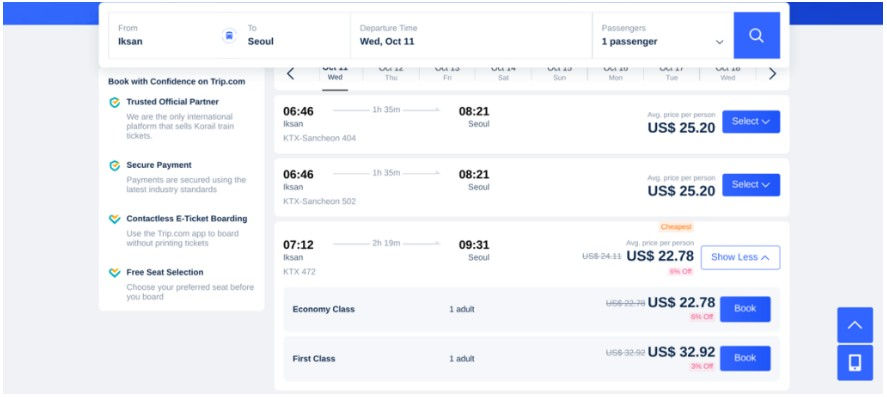
Then you will be brought to this page where you input your info and click "Continue" when you are done. Trip will then send the tickets to your email.

So no matter if you use Trip or KORAILTALK, make sure that you have your ticket on hand when you ride the train because sometimes they will come around and scan that QR code on your ticket to make sure you have a legit ticket, are in the right seat, on the right train, etc.
Wonderful
Wonderful: Wonderful is a company of people who help foreigners in different countries. You can reach out to them for help with buying a train ticket, bus ticket, baseball ticket, concert tickets, almost anything. They cost a fee in addition to what you are paying for but this is helpful when items in Korea require either a Korean credit card or an Alien Registration Card (ARC). You make an account on their website and then you can message them and request for help with whatever you are trying to do/purchase.
Below is a picture of their homepage:

T-Money Card
Now this last one is not an app, but consider if your key for most public transportation. The T-Money card can be used for subway and bus fares and things like that. You can buy them at pretty much any convenience store and, as long as you have cash, you can add more money to your card at any convenience store. Even if you don't know Korean you can just show this card and some Korean money (won) to the cashier and they will know what you are trying to do. The below pictures are just some basic designs for the T-Money cards, but they have ones with some fun designs on them as well!

Travel Agent
Last option, and a shameless, plug, you can contact me and I can help you sort out all of your travel plans, get your train tickets, organize transport and everything that you need! Visit my contact page if this is something that interests you!
I hope this helped demystify things a bit guys and hope that it helps on your next trip to Korea!! Have a great time!


Comments